Resources · Architectural Word Templates
Free Architectural FF&E & Finishes Schedule Template
Download a clean, standardised product schedule for Microsoft Word. Built specifically for architecture practices specifying finishes, fixtures, lighting, and appliances—complete with procurement lead times and GST breakdown.
Instant .docx download. Free for architectural practice use.
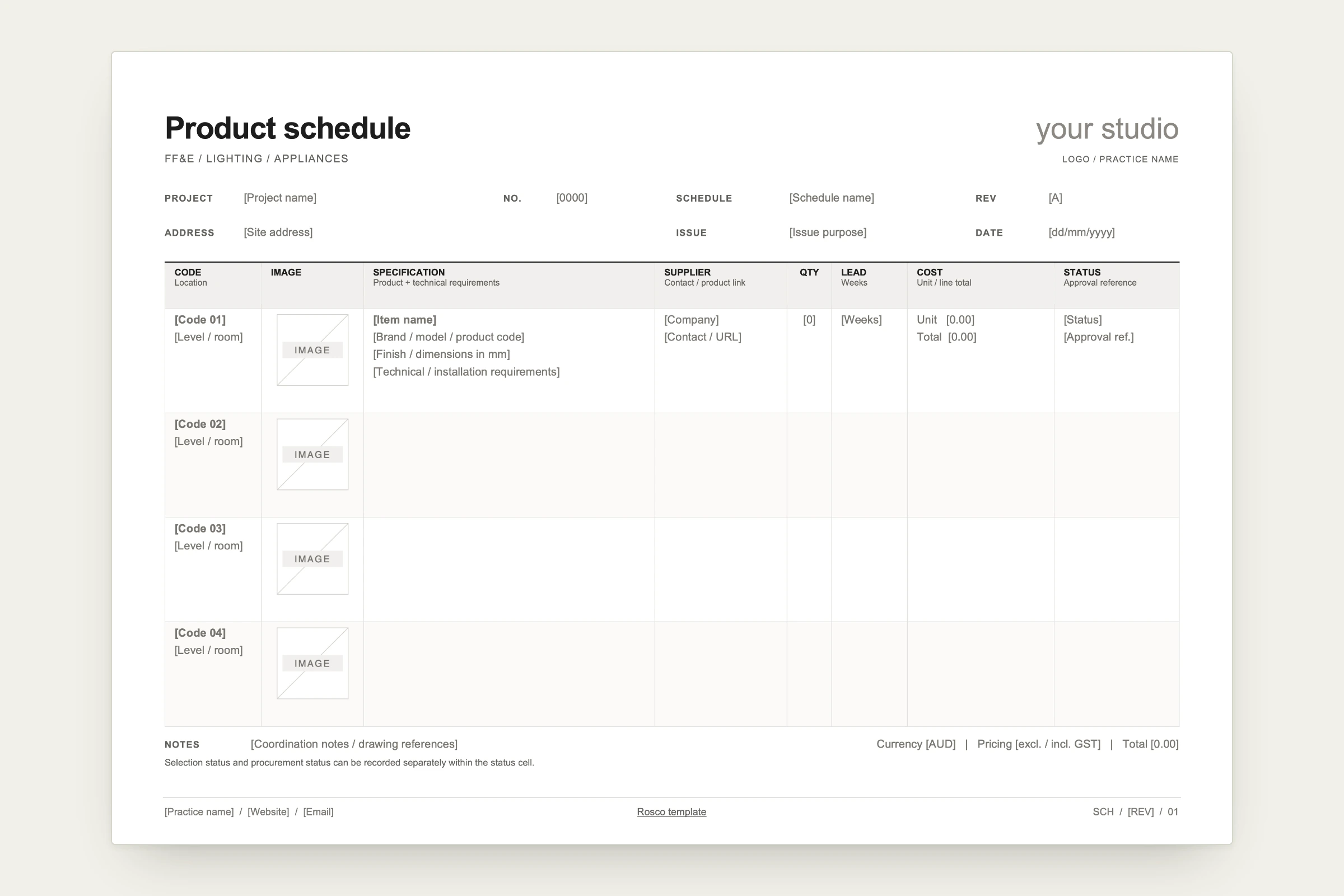
Designed for Architectural Procurement
Every specification in an architectural schedule carries commercial and contractual consequences. This template organises product selections so builders, quantity surveyors, and clients read from the same source of truth:
Code & Location
Assign sequential item codes (such as SAN-01, APP-02) mapped directly to room numbers and levels so drawing callouts match the schedule.
Visual Reference Box
Fixed-dimension image cells to hold product cut-sheet photos without distorting row heights across page breaks.
Technical Specification
Tiered fields covering item name, brand/model code, required finish, dimensions in millimetres, and technical installation requirements.
Supplier & Link
Contact name, supplier company, and direct product URL for contractor procurement enquiries.
Lead Time (Weeks)
Explicit tracking for long-lead items (imported stone, custom joinery, architectural tapware) to manage the builder's critical path.
Cost & Currency
Transparent unit and line total tracking with clear AUD and GST status toggles to prevent disputes during tender review.
Approval & Status
Separate tracking for client design sign-off versus contractor procurement status.
Two Ways to Use This Schedule
- 01
Manual Studio Template: Download the .docx file, add your practice logo and fonts in Word, and distribute manually as a PDF on your own letterhead.
- 02
Automated in Rosco: Upload the template once under Settings → Export Templates. Paste supplier links into Rosco’s FF&E Schedule tool to extract product details automatically, then export formatted schedules onto your letterhead in seconds.
Frequently Asked Questions
What information does this architectural FF&E template track?
The schedule tracks item codes, room locations, photo placeholders, full specifications (brand, model, finish, dimensions, technical requirements), supplier contact details and web links, quantities, procurement lead times in weeks, unit and line costs (AUD, inc/ex GST), and approval references.
Can I customise this template with my own studio branding?
Yes. The Word document features designated header fields for your practice logo, studio contact details, project number, revision status, and issue purpose to customise on your letterhead.
How does Rosco automate this schedule?
In Rosco, pasting a product URL automatically extracts product imagery, dimensions, finishes, and supplier information into your schedule. When exporting, Rosco populates your branded Word template automatically without manual re-typing.