Resources · Architectural Word Templates
Free Architectural Defects Schedule & Inspection Template
Download a professional defects and site observation schedule template for Microsoft Word. Structured for site inspections, trade rectification instructions, and practical completion close-outs—protecting your practice with clear paper trails.
Instant .docx download. Free for architectural practice use.
The Site Trail That Protects the Practice
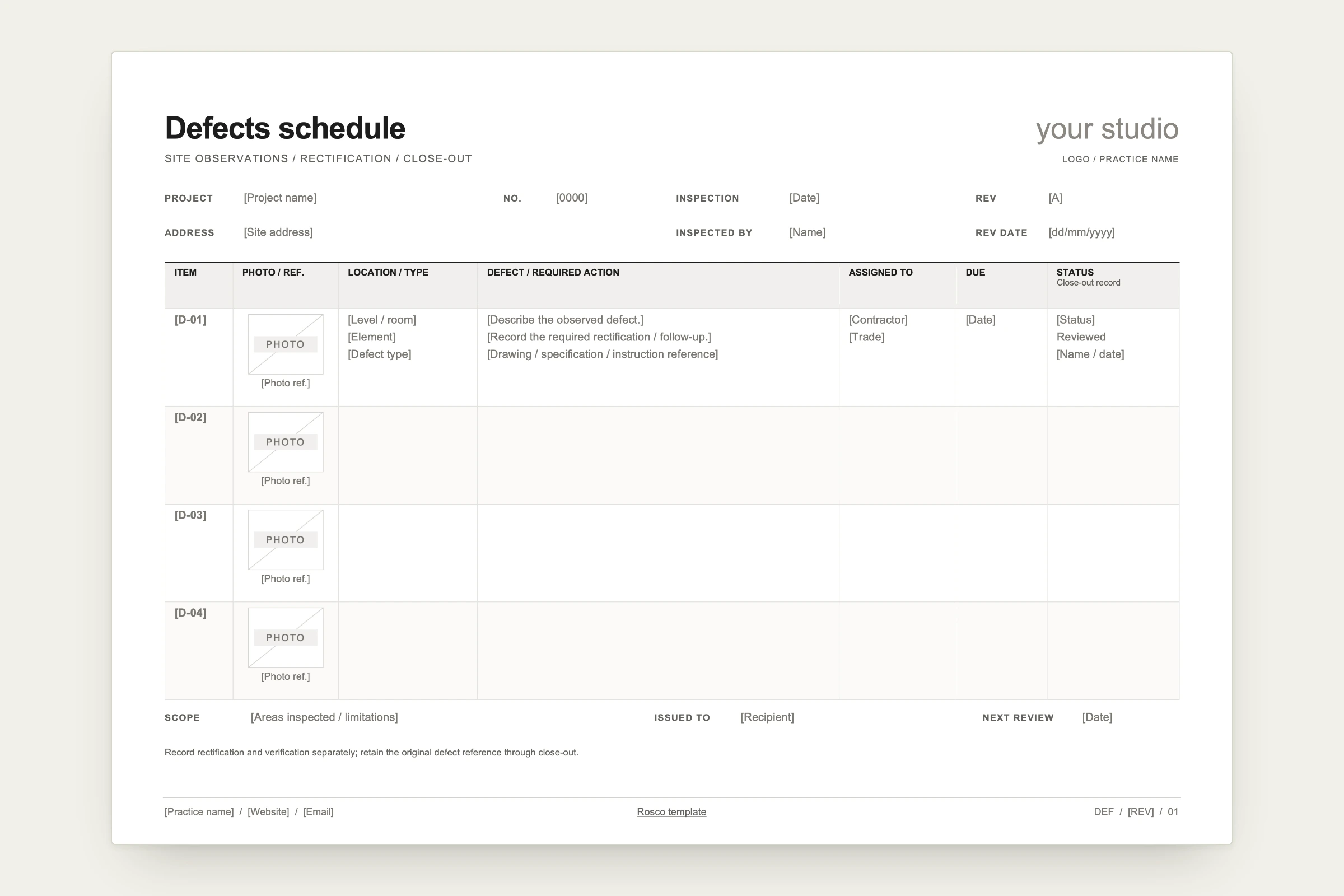
Site instructions and defect lists must withstand contractual scrutiny under ABIC and standard Australian building contracts. This template provides clear physical and technical records:
Inspection Metadata
Records project details, inspection date, architect/inspector name, and revision sequence to track rectification across multiple site walks.
Inspection Scope & Limitations
Dedicated header field to state visible boundaries and access limitations (such as "Visual inspection of ground floor finishes only; ceiling voids and locked service risers not inspected").
Item Code & Photo Reference
Unique defect ID (such as D-01) coupled with a locked photo cell and timestamp/drawing reference.
Location & Defect Category
Explicit level/room and trade category (Workmanship, Finish, Plumbing, Carpentry) so builders can sort actions by subcontractor.
Required Action & Clause Reference
Concise description of the non-compliant work alongside reference to relevant drawings, specifications, or contract clauses.
Assigned Trade & Rectification Target
Explicit contractor name and due date for completion.
Two-Stage Close-Out Status
Tracks whether an item is Open, Rectified by Trade, or Formally Verified by Architect with reviewer initials and date.
Two Ways to Use This Schedule
- 01
Manual Word Document: Download the .docx file, complete it digitally or on a tablet during site visits, and export as a PDF to issue to builders.
- 02
Live Site Administration in Rosco: Log items directly into Rosco’s Site Administration register from your phone or laptop on site. Filter defects by trade or room, update resolution statuses live, and export on your branded template with a single click.
Frequently Asked Questions
What stages of construction is this defects template designed for?
The template is structured for ongoing site observation logs, pre-practical completion snagging lists, formal practical completion defect schedules, and defect liability period close-outs.
Why is the inspection scope and limitation section important?
The scope block defines the physical boundaries and conditions of the inspection (e.g., visual inspection only, inaccessible ceiling spaces excluded), protecting the architectural practice against claims for concealed defects.
How does Rosco simplify defect management on site?
Rosco's Site Administration feature allows architects to log defects, attach photos, and assign trades while walking the job site. When finished, Rosco generates and issues a formatted defect schedule on your custom template immediately.